-
CRUD operations in AngularJS and MVC5
almost 10 years ago
This example demonstrate how to use AngularJS with MVC5 and WebAPI for CRUD operations(Read,Insert,Update,Delete).
1. First step is to create table for CRUD operations.
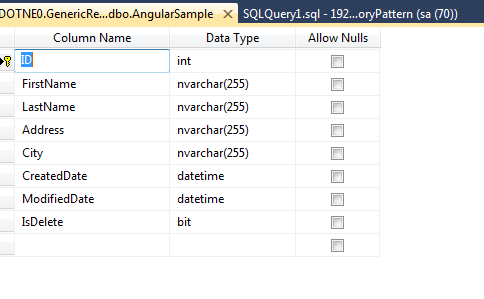
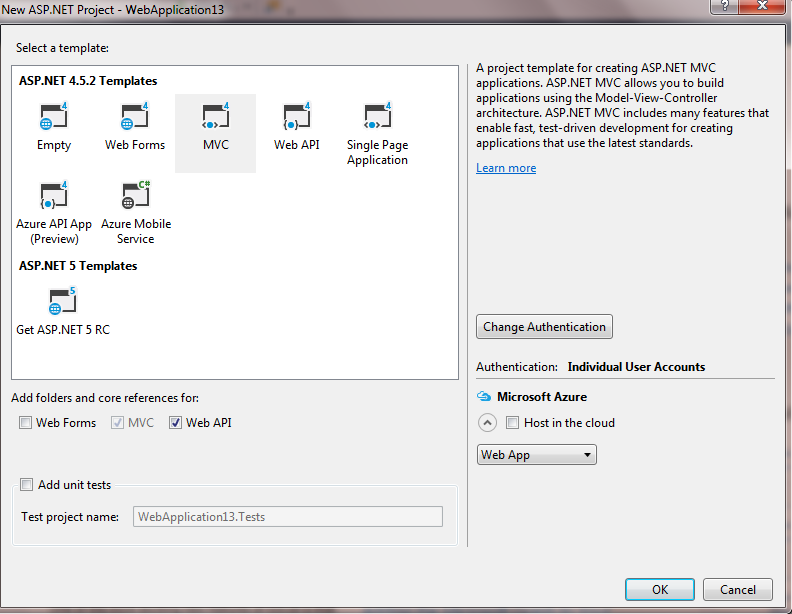
2. Create a new project in ASP.NET MVC 5. Select WebAPI while creating project.
3. Create Model according to this table columns.
 public class AngularModel
    {
        public int Id { get; set;}

        [Display(Name = "FirstName")]
        [Required(ErrorMessage = "First name is mandatory")]
        [MaxLength(255, ErrorMessage = "First name is exceeding max size limit 255")]
        public string FirstName { get; set; }

        [Display(Name = "LastName")]
        [Required(ErrorMessage = "Last name is mandatory")]
        [MaxLength(255, ErrorMessage = "Last name is exceeding max size limit 255")]
        public string LastName { get; set; }

        [Display(Name = "Address")]
        [Required(ErrorMessage = "Address is mandatory")]
        [MaxLength(255, ErrorMessage = "Address is exceeding max size limit 255")]
        public string Address { get; set; }

        [Display(Name = "City")]
        [Required(ErrorMessage = "City is mandatory")]
        [MaxLength(255, ErrorMessage = "City is exceeding max size limit 255")]
        public string City { get; set; }

        public string Message { get; set; }
    }
4. Create Common class in Models to store Result
  public enum Status
    {
        Ok=1,
        Failure=2,
        Error=4
    }

    public class Result
    {
        public Status Status { get; set; }
        public string Message { get; set; }
    }
5. Create Repository folder in the root directory. Add a new class HomeRepository.cs. Implement the methods to Insert, Update, Delete, Read
 /// <summary>
        /// Insert new record
        /// </summary>
        /// <param name="model"></param>
        /// <returns></returns>
        public Result InsertAngularRecords(AngularModel model)
        {
            Result result = new Result();
            int response = 0;
            try
            {
                using (SqlConnection con = new SqlConnection(ConnectionString))
                {
                    using (SqlCommand cmd = new SqlCommand("InsertAngularRecords", con))
                    {
                        cmd.CommandType = CommandType.StoredProcedure;

                        cmd.Parameters.Add("@FirstName", SqlDbType.NVarChar).Value = model.FirstName;
                        cmd.Parameters.Add("@LastName", SqlDbType.NVarChar).Value = model.LastName;
                        cmd.Parameters.Add("@Address", SqlDbType.NVarChar).Value = model.Address;
                        cmd.Parameters.Add("@City", SqlDbType.NVarChar).Value = model.City;
                        if (con.State == ConnectionState.Closed)
                            con.Open();
                        response = cmd.ExecuteNonQuery();
                    }
                }
                if (response > 0)
                {
                    result.Status = Status.Ok;
                    result.Message = "Record inserted successfully";
                }

                else
                {
                    result.Status = Status.Failure;
                    result.Message = "Error Occurred";
                }
            }
            catch (SqlException ex)
            {
                result.Status = Status.Failure;
                result.Message = ex.InnerException.Message;
            }

            catch (Exception ex)
            {
                result.Status = Status.Failure;
                result.Message = ex.InnerException.Message;
            }

            return result;
        }

        /// <summary>
        /// Get all records
        /// </summary>
        /// <returns></returns>

        public List<AngularModel> GetAllAngularRecords()
        {
            List<AngularModel> listModel = new List<AngularModel>();
            try
            {
                using (SqlConnection con = new SqlConnection(ConnectionString))
                {
                    using (SqlCommand cmd = new SqlCommand("GetAllAngularRecords", con))
                    {
                        cmd.CommandType = CommandType.StoredProcedure;

                        if (con.State == ConnectionState.Closed)
                            con.Open();
                        SqlDataReader dr = cmd.ExecuteReader();
                        while (dr.Read())
                        {
                            AngularModel model = new AngularModel();
                            model.Id = Convert.ToInt32(dr["ID"]);
                            model.FirstName = Convert.ToString(dr["FirstName"]);
                            model.LastName = Convert.ToString(dr["LastName"]);
                            model.Address = Convert.ToString(dr["Address"]);
                            model.City = Convert.ToString(dr["City"]);
                            listModel.Add(model);
                        }
                    }
                }
            }
            catch (SqlException ex)
            {
                AngularModel model = new AngularModel();
                model.Message = ex.InnerException.Message;
                listModel.Add(model);
            }
            catch (Exception ex)
            {
                AngularModel model = new AngularModel();
                model.Message = ex.InnerException.Message;
                listModel.Add(model);
            }
            return listModel;
        }

        /// <summary>
        /// Get Record using Id
        /// </summary>
        /// <param name="ID"></param>
        /// <returns></returns>
        public AngularModel GetAngularRecordByID(int ID)
        {
            AngularModel model = new AngularModel();
            try
            {
                using (SqlConnection con = new SqlConnection(ConnectionString))
                {
                    using (SqlCommand cmd = new SqlCommand("GetAngularRecordByID", con))
                    {
                        cmd.CommandType = CommandType.StoredProcedure;

                        cmd.Parameters.Add("@ID", SqlDbType.Int).Value = ID;
                        if (con.State == ConnectionState.Closed)
                            con.Open();
                        SqlDataReader dr = cmd.ExecuteReader();
                        while (dr.Read())
                        {
                            model.Id = Convert.ToInt32(dr["ID"]);
                            model.FirstName = Convert.ToString(dr["FirstName"]);
                            model.LastName = Convert.ToString(dr["LastName"]);
                            model.Address = Convert.ToString(dr["Address"]);
                            model.City = Convert.ToString(dr["City"]);
                        }
                    }
                }
            }
            catch (SqlException ex)
            {
                model.Message = ex.InnerException.Message;
            }
            catch (Exception ex)
            {
                model.Message = ex.InnerException.Message;
            }
            return model;
        }

        /// <summary>
        /// Update record
        /// </summary>
        /// <param name="model"></param>
        /// <returns></returns>
        public Result UpdateAngularRecord(AngularModel model)
        {
            Result result = new Result();
            int response = 0;
            try
            {
                using (SqlConnection con = new SqlConnection(ConnectionString))
                {
                    using (SqlCommand cmd = new SqlCommand("UpdateAngularRecord", con))
                    {
                        cmd.CommandType = CommandType.StoredProcedure;
                        cmd.Parameters.Add("@ID", SqlDbType.Int).Value = model.Id;
                        cmd.Parameters.Add("@FirstName", SqlDbType.NVarChar).Value = model.FirstName;
                        cmd.Parameters.Add("@LastName", SqlDbType.NVarChar).Value = model.LastName;
                        cmd.Parameters.Add("@Address", SqlDbType.NVarChar).Value = model.Address;
                        cmd.Parameters.Add("@City", SqlDbType.NVarChar).Value = model.City;
                        if (con.State == ConnectionState.Closed)
                            con.Open();
                        response = cmd.ExecuteNonQuery();
                    }
                }
                if (response > 0)
                {
                    result.Status = Status.Ok;
                    result.Message = "Record updated successfully";
                }

                else
                {
                    result.Status = Status.Failure;
                    result.Message = "Error Occurred";
                }
            }
            catch (SqlException ex)
            {
                result.Status = Status.Failure;
                result.Message = ex.InnerException.Message;
            }

            catch (Exception ex)
            {
                result.Status = Status.Failure;
                result.Message = ex.InnerException.Message;
            }

            return result;
        }

        /// <summary>
        /// Delete existing record
        /// </summary>
        /// <param name="ID"></param>
        /// <returns></returns>
        public Result DeleteAngularRecord(int ID)
        {
            Result result = new Result();
            int response = 0;
            try
            {
                using (SqlConnection con = new SqlConnection(ConnectionString))
                {
                    using (SqlCommand cmd = new SqlCommand("DeleteAngularRecord", con))
                    {
                        cmd.CommandType = CommandType.StoredProcedure;

                        cmd.Parameters.Add("@ID", SqlDbType.Int).Value = ID;
                        if (con.State == ConnectionState.Closed)
                            con.Open();
                        response = cmd.ExecuteNonQuery();
                    }
                }
                if (response > 0)
                {
                    result.Status = Status.Ok;
                    result.Message = "Record deleted successfully";
                }

                else
                {
                    result.Status = Status.Failure;
                    result.Message = "Error Occurred";
                }
            }
            catch (SqlException ex)
            {
                result.Status = Status.Failure;
                result.Message = ex.InnerException.Message;
            }

            catch (Exception ex)
            {
                result.Status = Status.Failure;
                result.Message = ex.InnerException.Message;
            }

            return result;
        }
6. Create new folder Interfaces in Repository folder and add IHomeRepository.cs class
interface IHomeRepository
    {
        Result InsertAngularRecords(AngularModel model);

        List<AngularModel> GetAllAngularRecords();

        AngularModel GetAngularRecordByID(int ID);

        Result UpdateAngularRecord(AngularModel model);

        Result DeleteAngularRecord(int ID);
    }
7. Rename Controller folder to ControllerUI and create one new folder ControllerAPI.
8. In Controller API,right click on this folder and add a new WebAPI 2 Empty Controller name HomeController.9. In HomeController under ControllerUI , add new method
 public ActionResult AngularCrud()
        {
            return View();
        }
10. In HomeController under ControllerAPI , call Repository method in WebAPI.
 public class HomeController : ApiController
    {
        private IHomeRepository iHomeRepository;

        public HomeController()
        {
            iHomeRepository = new HomeRepository();
        }

		   [HttpGet]
        public IHttpActionResult Get()
        {
            List<AngularModel> listModel = new List<AngularModel>();
            try
            {
                listModel = iHomeRepository.GetAllAngularRecords();   // get all records
            }
            catch (Exception ex)
            {
                return InternalServerError(ex);
            }
            if (listModel.Count > 0)
                return Ok(listModel);
            else
                return NotFound();
        }

        [HttpGet]
        public IHttpActionResult Get(int id)
        {
            AngularModel model = new AngularModel();
            try
            {
                model = iHomeRepository.GetAngularRecordByID(id);  // get records by id
            }
            catch (Exception ex)
            {
                return InternalServerError(ex);
            }
            return Ok(model);
        }

        [HttpPost]
        // POST api/<controller>
        public IHttpActionResult POST(AngularModel model)
        {
            if (!ModelState.IsValid)
            {
                return BadRequest(ModelState);
            }

            Result result = new Result();
            try
            {
                result = iHomeRepository.InsertAngularRecords(model);   // insert new record
            }
            catch (Exception ex)
            {
                //log exception
                 return InternalServerError(ex);
            }
             return Ok(result);
        }

        [HttpPost]
        // POST api/<controller>/<action>/<id>
        public IHttpActionResult Update(int id,AngularModel model)
        {
            if (!ModelState.IsValid)
            {
                return BadRequest(ModelState);
            }
            Result result = new Result();
            try
            {
                model.Id = id;
                result = iHomeRepository.UpdateAngularRecord(model);   //update existing record

            }
            catch (Exception ex)
            {
                //log exception
                return InternalServerError(ex);
            }

            return Ok(result);
        }

        [HttpPost]
        // POST api/<controller>/<action>/<id>
        public IHttpActionResult Delete(int id)
        {
            Result result = new Result();
            try
            {
                result = iHomeRepository.DeleteAngularRecord(id);  // delete record
            }
            catch (Exception ex)
            {
                //log exception
                return InternalServerError(ex);
            }
            return Ok(result);
        }

	}
11. To call this WebAPI from AngularSample.js file , we have to add routes map in WebApiConfig.cs after DefaultApi as:
config.Routes.MapHttpRoute(
                name: "DefaultApi",
                routeTemplate: "api/{controller}/{id}",
                defaults: new { id = RouteParameter.Optional }
            );

            config.Routes.MapHttpRoute(
              name: "ActionAPI",
              routeTemplate: "api/{controller}/{action}/{id}",
              defaults: new { id = RouteParameter.Optional }
          );
12. Create View and AngularSample.js file
View:
@{
    ViewBag.Title = "Angular Crud";
}

@Styles.Render("~/Content/css")
<h2>Angular Crud</h2>

<div ng-app="angularSample" id="body">
    <div ng-controller="angularController">
        <table class="table table-bordered table-hover">
            <tr>
                <th>S.No.</th>
                <th>FirstName</th>
                <th>LastName</th>
                <th>Address</th>
                <th>City</th>
                <th>Actions</th>
            </tr>
            <tr data-ng-repeat="employee in employees">

                <td>{{ employee.Id }}</td>

                <td>{{ employee.FirstName }}</td>

                <td>{{ employee.LastName }}</td>

                <td>{{ employee.Address }}</td>

                <td>{{ employee.City }}</td>

                <td>
                    <button id="edit" class="btn btn-link" ng-click="edit(employee)">Edit</button> /
                    <button id="delete" class="btn btn-link" ng-click="deleteRecord(employee)">Delete</button>
                </td>

            </tr>

        </table>

        <br />
        <div>
            <input type="button" value="Add new" ng-click="ShowAdd()" class="btn btn-info" />
        </div>
        <br />
        <div ng-hide = "IsHidden">
            <form name="employeeForm" >
                <table>

                    <tr style="display:none">
                        <td>Id</td>
                        <td><input type="text" ng-model="Id" class="form-control" />  </td>
                    </tr>
                    <tr>
                        <td>First name</td>
                        <td><input type="text" name="firstName" ng-model="FirstName" class="form-control form-group" ng-required="true"  />
                          </td>
                    </tr>
                    <tr>
                        <td> Last name</td>
                        <td><input type="text" ng-model="LastName" class="form-control form-group" ng-required="true"  />  </td>
                    </tr>
                    <tr>
                        <td>Address</td>
                        <td><input type="text" ng-model="Address" class="form-control form-group" ng-required="true"  />  </td>
                    </tr>
                    <tr>
                        <td>City</td>
                        <td><input type="text" ng-model="City" class="form-control form-group" ng-required="true"  />  </td>
                    </tr>
                </table>
            </form>
            <input type="button" id="btnAddUpdate" value="Add" ng-click="employeeForm.$valid && InsertRecord()"  class="btn btn-primary"/>
            <input type="button" value="Cancel" ng-click="HideAdd()" class="btn btn-danger" />
        </div>

    </div>
</div>
@section Scripts {
    @Scripts.Render("~/bundles/jqueryval")
    <script src="~/Scripts/Angular/AngularSample.js"></script>
}
AngularSample.js:
// Defining angularjs module
var app = angular.module('angularSample', []);

// Defining angularjs Controller
app.controller("angularController", function ($scope, $http) {
    ShowAllRecords();
    $scope.model;
    $scope.IsHidden = true;
    $scope.ShowAdd = function () {
        $("#btnAddUpdate").val("Add");
        //If DIV is hidden it will be visible
        $scope.IsHidden = false;
        ClearFields();

    }

    $scope.HideAdd = function () {
        //If DIV is hidden it will be visible
        $scope.IsHidden = true;
        ClearFields();
    }

    // Insert Record
    $scope.InsertRecord = function () {
        var response;
        if ($("#btnAddUpdate").val() == "Add") {
            response = $http({
                method: 'POST',
                url: '/api/Home',
                data: JSON.stringify($scope.model)
            });
        }
        else {
            response = $http({
                method: 'POST',
                url: '/api/Home/Update/' + $scope.Id,
                data: JSON.stringify($scope.model)   //pass model in json form
            });
        }
        response.success(function (data) {
            alert(data.Message);
            ShowAllRecords();
            ClearFields();
            $scope.IsHidden = true;
        });
        response.error(function (data) {
            alert("Error in inserting record");
        });

    }

    // Get Record By Id
    $scope.edit = function () {
        var response = $http({
            method: 'GET',
            url: '/api/Home/' + this.employee.Id,
        });
        response.success(function (data) {
            $scope.IsHidden = false;
            $scope.model = data;
            $("#btnAddUpdate").val("Update");
        });
        response.error(function (data) {
            alert("Error occurred");
        });

    }

    //Delete record
    $scope.deleteRecord = function () {
        //confirm dialog
        var r = confirm("Are you sure to delete record?");
        if (r != true) {
            return false;
        }
        response = $http({
            method: 'POST',
            url: '/api/Home/Delete/' + this.employee.Id
        });

        response.success(function (data) {
            alert(data.Message);
            ShowAllRecords();
        });
        response.error(function (data) {
            alert("Error in deleting record");
        });
    }

    //Show all records
    function ShowAllRecords() {
        var response = $http({
            method: 'GET',
            url: '/api/Home'
        });
        response.success(function (data) {
            $scope.employees = data;
        });
        response.error(function (data) {
            alert("Error occurred");
        });
    }

    //Clear all textboxes
    function ClearFields() {
        $scope.model.FirstName = "";
        $scope.model.LastName = "";
        $scope.model.Address = "";
        $scope.model.City = "";
    }
});
OUTPUT:
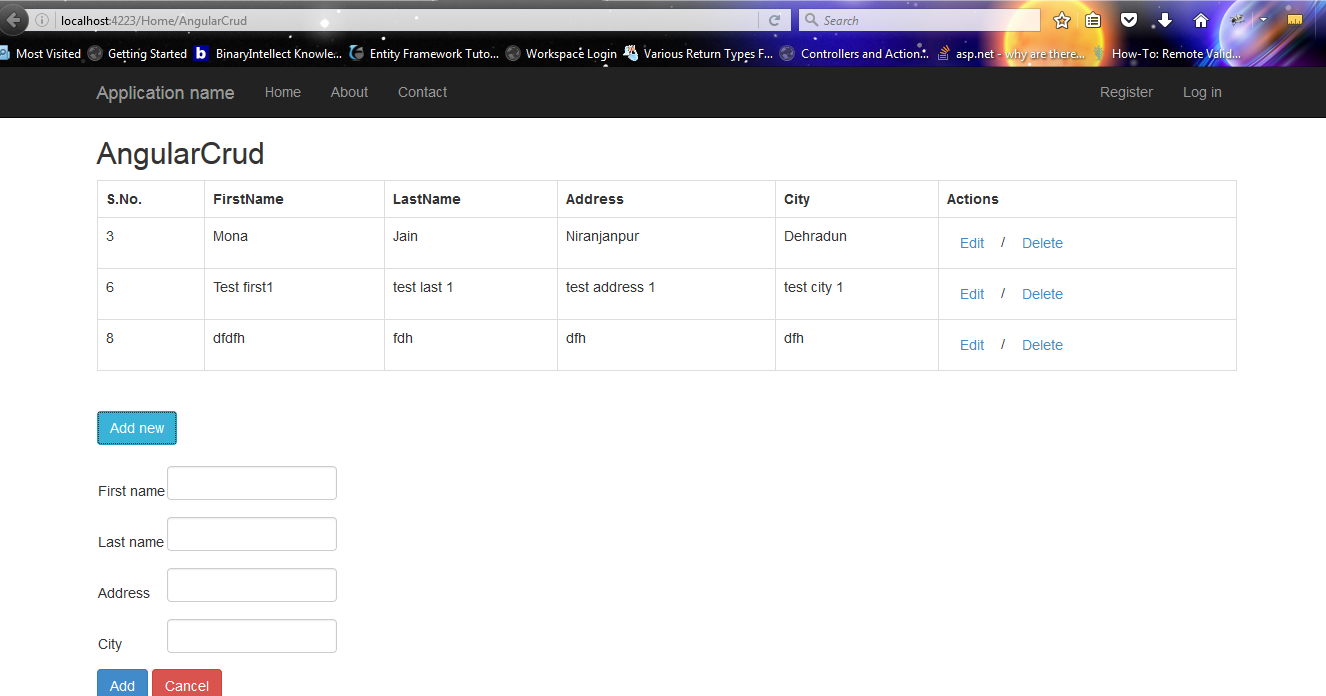
Hope, this code will help you. Thanks


0 Comment(s)